WhatsApp Will Stop Working on Some Android Phones Next Week: Check Yours Now
WhatsApp is ending support for Android 5.0 and 5.1 phones on September 8, 2026. Here's how to check your Android version, what happens next, and what you should do before the deadline.
If you have an old Android phone sitting at home, there is one thing you should check before September 8. WhatsApp is changing its minimum Android requirement. According to WhatsApp's official Help Center, the app will continue supporting Android 5.0 for now, but from September 8, 2026, only Android 6.0 and newer versions will be supported.
That does not mean WhatsApp is suddenly shutting down for everyone. The change only affects phones that are still running Android 5.0 or Android 5.1 and cannot move to a newer Android version. For most people with relatively recent smartphones, there is nothing to worry about. But if you're using an older phone, especially one that has not received software updates for years, it is worth checking now rather than discovering the problem after WhatsApp stops working.
The good news is that checking your Android version takes less than a minute. Here's exactly what you need to know.
What Is Changing on September 8?
The important number is Android 6.0. WhatsApp's official supported-devices page says that starting September 8, 2026, Android 6 and newer versions will be supported. Phones running Android 5.0 or 5.1 will therefore fall outside the supported range.
This is an operating-system change, not a ban on a particular phone brand. So you cannot simply look at your phone's brand and know whether it is affected. Two phones from the same manufacturer could have different outcomes depending on the Android version installed and whether the phone can be updated. That is why checking your software version is more useful than searching for a long list of phone models.
How to Check Your Android Version
You don't need a special app to check this. The exact menu name can vary between Samsung, Xiaomi, OnePlus, Motorola, Google Pixel and other Android phones, but the information is normally found inside the Settings app.
Look for a section called "About phone," "About device" or something similar. Then find the Android version.
If your phone shows Android 6.0 or anything newer, this particular WhatsApp support change should not affect you. If it shows Android 5.0 or Android 5.1, your phone is in the affected range unless the manufacturer provides an update that moves it to Android 6.0 or newer.
Open Settings on your Android phone.
Look for About phone or About device.
Find Android version.
Check the number shown there.
If it is Android 6.0 or newer, you meet WhatsApp's new minimum requirement.
If it is Android 5.0 or 5.1, check whether a software update is available.
What Happens If Your Phone Is Still on Android 5?
This is the part many users will want to know. WhatsApp says it regularly stops supporting older operating systems so it can keep up with newer technology and security requirements. The company also says affected users will be notified and reminded to upgrade.
After the September 8 deadline, a phone that remains on an unsupported Android version will no longer be supported by WhatsApp. That means you should not plan on continuing to use the phone indefinitely just because the app happens to work today.
There is also an important difference between "the app works today" and "the phone is officially supported." An unsupported phone may continue functioning temporarily, but you should not depend on that for an important messaging account. If WhatsApp is important for your work, family conversations, payments or other daily communication, it is better to prepare before the cutoff.
Can You Fix It Without Buying a New Phone?
Maybe. The first thing to check is whether your phone has a software update available. Some older phones may be capable of running a newer Android version even if they are currently using an older release. Open Settings and look for Software Update, System Update or a similar option.
If an official update is available, install it and then check your Android version again. However, some very old phones simply cannot move beyond Android 5.x. If the manufacturer no longer provides updates for the device, changing a WhatsApp setting will not solve the problem. In that situation, moving to a newer supported phone is the practical long-term solution.
Back Up Your WhatsApp Chats Before You Switch Phones
If your phone cannot be updated and you need to move to another device, don't wait until the last day. Your WhatsApp account is more than the app itself. It may contain years of conversations, photos, videos, documents and other information you want to keep.
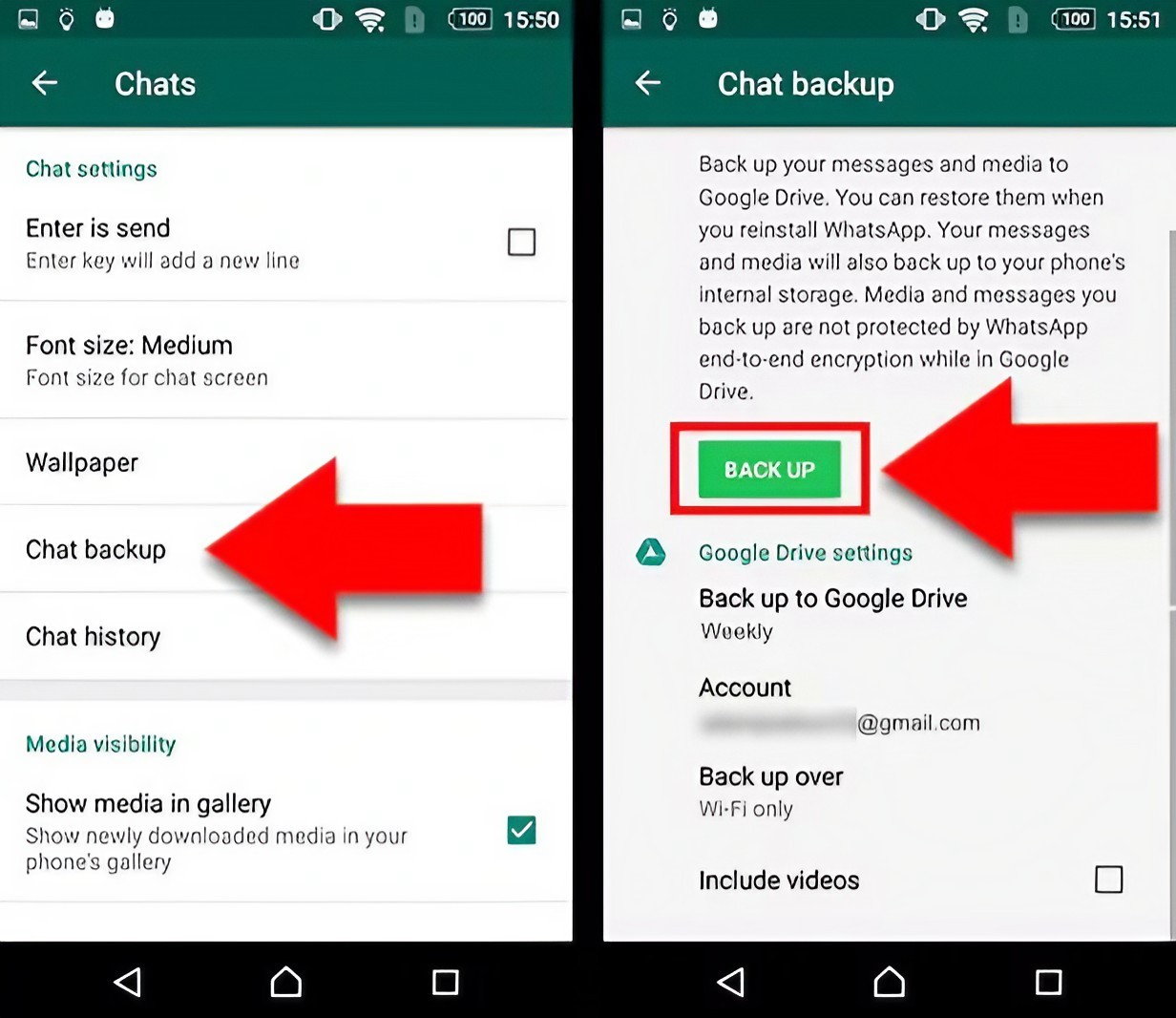
Before moving to a new phone, make sure your chats are backed up using WhatsApp's available backup options. Then, when you set up WhatsApp on the new supported phone, you can follow the restore process offered by the app.
The exact backup and restore experience can depend on your phone and account setup, so check that your latest backup has completed before you erase or abandon your old device.
Which Phones Are Actually Affected?
There is no simple "Samsung list" or "Xiaomi list" that tells everyone whether their phone is affected. The deciding factor is the Android version. Some reports have highlighted very old models from manufacturers such as Samsung, Sony and OnePlus, but the safer way to check is directly on your phone rather than relying on a model list.
For example, an old phone that is still running Android 5.1 could be affected, while another phone from the same brand that has been updated to Android 6 or later would meet WhatsApp's new minimum requirement. This is why checking your own device is much more reliable than forwarding a social-media post claiming that an entire brand has been blocked.
Why Does WhatsApp Keep Dropping Older Phones?
It can seem unfair when an app stops supporting an old phone that still works perfectly well. But apps such as WhatsApp have to support millions of devices and operating-system combinations. Older Android versions may lack newer security features, system capabilities or technical frameworks that developers need for modern versions of an app.
WhatsApp says its supported operating systems are reviewed regularly, and that older devices can lack the latest security updates or functionality required by the app. There is also a practical development reason. Every older Android version that developers continue supporting adds another environment they have to test and maintain. At some point, reducing support for very old systems allows the app to focus its resources on newer devices.
What You Should Do Today
Open your phone's Settings.
Check the Android version under About phone or About device.
If you're on Android 5.0 or 5.1, check for an official software update.
If no update is available, plan to move to a supported phone.
Back up your important WhatsApp chats before switching devices.
Do not wait until September 8 if WhatsApp is essential to your daily communication.
The Bottom Line
The good news is that this change will not affect most modern Android phones. WhatsApp's official requirement is moving from Android 5.0 and newer to Android 6.0 and newer on September 8, 2026. If your phone runs Android 6 or later, there is no reason to panic about this particular change.
If you're still on Android 5.0 or 5.1, however, now is the right time to check whether your phone can be updated. And if it cannot, don't wait until WhatsApp stops working. Back up your chats, plan your move and make sure your next phone runs a supported version of Android.
The important lesson is simple: don't believe a random "affected phones" list before checking your own device. Your Android version tells you much more.
Helpful answers
Frequently Asked Questions
Will WhatsApp stop working on Android phones in September 2026?+
WhatsApp will stop supporting Android versions older than Android 6.0 from September 8, 2026. This mainly affects phones still running Android 5.0 or 5.1.
How do I check if my phone is affected?+
Open Settings, find About phone or About device, and look for Android version. Android 6.0 or newer meets WhatsApp's new minimum requirement.
Will WhatsApp stop working on my Samsung phone?+
Not simply because it is a Samsung phone. The important factor is the Android version. A Samsung phone running Android 6 or newer meets WhatsApp's new minimum requirement.
Can I keep using WhatsApp on Android 5.0?+
WhatsApp's official support page says Android 5.0 and 5.1 will no longer be supported from September 8, 2026. If your phone cannot be updated to Android 6 or newer, you should prepare to move to a supported device.
Do I need to buy a new phone immediately?+
Not necessarily. First check whether your current phone has an official software update available. If it can be updated to Android 6 or newer, you may be able to continue using it.
What should I do before changing phones?+
Back up your important WhatsApp chats and make sure the new phone meets WhatsApp's supported operating-system requirements before switching.
Why is WhatsApp ending support for old Android versions?+
WhatsApp says it regularly reviews supported operating systems so it can keep up with newer technology and security requirements. Older systems may lack security updates or functionality needed by newer versions of the app.